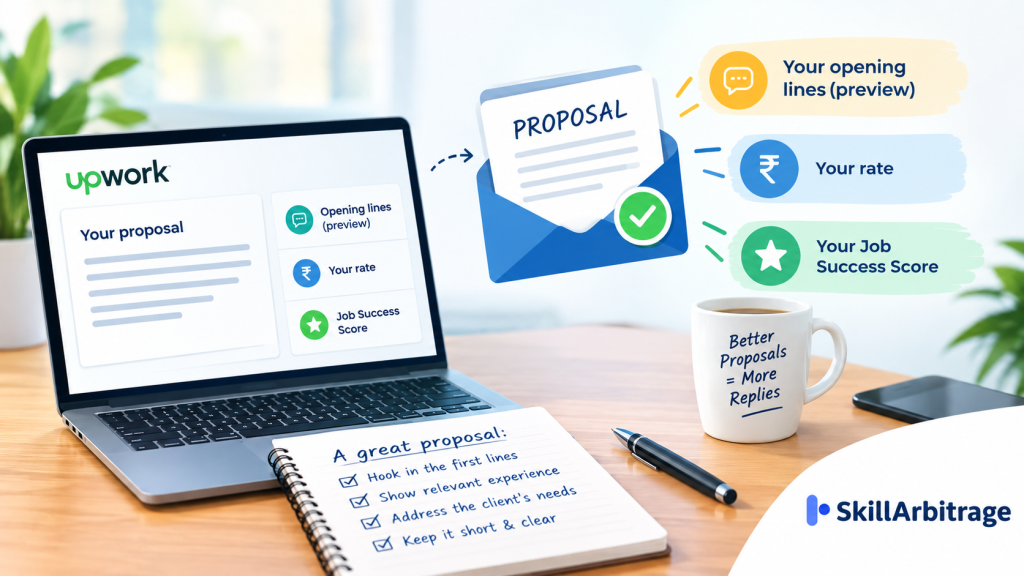

Most freelancers write an Upwork proposal as a shortened CV and send it to every job that looks close enough. The client sees far less of it than that. Upwork’s own guidance is explicit that clients first see only the opening lines of a proposal, displayed next to your name, profile photo, talent badges, hourly rate and Job Success Score, and decide from that preview whether to open the rest. The reply is won or lost in two or three sentences, before a single line about your experience is read.
That preview is also the part almost nobody edits. The paragraphs further down get rewritten, polished and spellchecked, while the opening stays whatever the template started with. And every send has a price: Connects, which Upwork sells at $0.15 each, in a quantity that changes from job to job.
So the cost of a weak opening isn’t only silence. It’s a Connects balance draining on jobs you were never really in the running for, because Upwork does not return Connects when a client simply picks someone else.
The preview isn’t only your words, either. Your hourly rate and your Job Success Score sit in the same row, which means a client scanning the list is weighing price and track record at the same moment they read your first sentence. Nothing further down the letter can repair a first line that gives them no reason to look past those two numbers.
The fix is small and specific. Four moves, roughly 200 words, written for the preview rather than for the profile page.
Why an Upwork proposal gets ignored
An Upwork proposal gets ignored because it is written for a page the client often never opens. The full proposal view holds your cover letter, your bid details and your answers to any screening questions. The results list holds almost none of that. It holds your first few sentences and a strip of profile data, and that is the screen on which the client decides who is worth a click.
Think of it as two documents with two different jobs. The preview has to earn the open. Everything below it has to earn the reply. Writing one document and hoping it does both is how a strong freelancer with real credentials ends up invisible.
The second half of the problem is arithmetic. Upwork prices Connects at $0.15 each, and the number a given job costs varies with project size, scope and market demand, so an expensive post can consume several times what a quiet one does. The platform also states plainly when those Connects come back, and the list of when they don’t is the longer one:
- the client rejects your proposal
- the client hires a different freelancer
- the job expires without anyone being hired
- you withdraw the proposal yourself
Connects are returned in two situations only: the client cancels the project before a contract exists, and Upwork removes the post for breaching its Terms of Service. Expired posts are specifically excluded from the first case.
The price of a send is not even fixed while you’re deciding. Upwork states that the number of Connects a job requires can change during the time the post is live, and its own advice to freelancers is to assess activity on the post before applying, because heavy proposal volume or interviews already underway may reduce your chances. A post that cost eight Connects on Monday can cost more by Wednesday, on a job that has already shortlisted someone.
There’s a further wrinkle on some posts. Upwork says certain job posts require a recorded video interview with Uma, its AI assistant, in place of a written cover letter, which removes the preview problem and replaces it with a different one. Those posts are the exception. On an ordinary one, the first three sentences are the whole audition.
So what does volume sending actually buy? On those terms, it buys a smaller balance and a thinner reason to open each one.
The practical reality is that the freelancers who report steady replies are usually sending fewer proposals into jobs they have read properly, which is the same discipline that separates a working beginner freelance portfolio from a hopeful one. Fewer sends, better read. That is the whole trade.
How to write an Upwork proposal
You write an Upwork proposal in four moves, and the order matters as much as the wording. Terms first, because Upwork asks for them before the letter. Then the opening lines, the proof, and a close that gives the client something specific to do.
So how long should the whole thing be? Upwork’s own guidance puts a cover letter at 200 to 300 words or fewer, which is tighter than most freelancers expect and is the single easiest change to make.

The opening lines the client sees
The opening lines have one job: prove you read the post. Upwork’s guidance suggests three ways in, and all three are about the client rather than about you.
Confirm that you understand what they’re looking for and what they want the project to achieve. Or restate their core problem in your own words. Or comment on something specific in the description.
Address the client by name if the name is recoverable. Upwork suggests checking the client’s profile, where feedback left by past freelancers sometimes names them (worth thirty seconds before you spend the Connects). Where there’s no name, a plain “Hi” or “Hello there” is fine. “To Whom It May Concern” is the one greeting Upwork names as outdated.
Worth flagging: some clients plant a word in the job post and ask you to open with it, purely to see who read to the bottom. Upwork says so directly. Miss it and the rest of the letter is irrelevant.
Here’s the difference in practice. A weak opener runs: I am a video editor with 5 years of experience working with international clients on various projects. A rewritten one runs: Your post says the product cuts are losing people at around six seconds, which is usually a hook problem rather than an editing problem. Same freelancer, same skills. Only the second one survives the preview.
Proof that matches the job post
Proof means a number attached to a specific outcome, not an adjective attached to yourself. Upwork’s own comparison makes the point with a sales example: “team player” is fine, but “managed a team of five salespeople and surpassed the annual target by 15%” is what a client can act on. One relevant result beats four unrelated ones.
Your portfolio does more of this work than your sentences do. Upwork reports that freelancers with portfolios published on the platform are hired nine times more often than those without them, and the proposal form lets you attach work samples or link specific items from your profile at the moment you apply. If a past project was completed on Upwork, the client can also see the public feedback attached to it.
So point at one piece, not the whole gallery. The reel in my portfolio titled “Serum launch, 9 cuts” is from that project, so you can see the pacing before you decide does more than a link to your profile ever will. The same logic drives every route into international work, whether you’re pitching on a marketplace or finding video editing clients in the US directly.
Your bid and your timeline
Your terms are set before you write a word of the letter. Upwork’s submission flow asks for your hourly rate and any suggested scheduled increases, or your bid on a fixed-price project and whether you want to be paid by project or by milestone, followed by your estimate of how long the work will take. That estimate is part of the pitch, not paperwork.
The number you enter is not the number you keep. Upwork’s Freelancer Service Fee runs from 0% to 15% per contract, is shown to you while you’re submitting the proposal, and locks once the contract begins. The platform’s own worked example: at a 10% fee, charging $22.22 an hour leaves you $20.
Run that calculation before you bid, every time. This is where most applicants go wrong, quoting the rate they want to earn and then discovering the gap after the contract starts. Whether you’re quoting as a no-code developer or working from published benchmarks like what SEO freelancers charge in India, the arithmetic runs the same way: decide your net, then gross it up.
Milestones are also a trust signal, not just a payment structure. And splitting a fixed-price job into a small first milestone and a larger second one tells a client who has never worked with you that they can stop cheaply.
The closing ask
Close with a specific next step. Upwork names “Thanks for your time” as the missed opportunity it is, and suggests closes that propose something concrete instead: a quick call about scope and timeline, or a short paid test so the client can see the work before committing. A question at the end gives the client an easy reply to write.
A paid test is the strongest of these for anyone without Upwork history, because it moves the risk off the client entirely. But keep it small and price it honestly: a test big enough to argue about defeats its own purpose.
Here is what the four moves look like assembled, on an imagined job post asking for twelve short product videos. The figures in it are illustrative, standing in for whatever your own numbers are:
Hi [client’s first name], your post says the current product cuts lose viewers at around six seconds. That’s usually a hook problem rather than an editing problem, and it’s fixable in the first two seconds of the cut.
On a similar set for a skincare brand last year, moving the price reveal from the end to second two took average view duration from 6 seconds to 11 across 40 videos, and the brand kept that format for its next three launches. The reel titled “Serum launch, 9 cuts” in my portfolio is from that set, so you can see the pacing before you decide.
For your 12 videos I’d work fixed price by milestone: 4 videos, your feedback, then the remaining 8, roughly 10 days end to end at the bid attached. Happy to cut one of your existing clips as a paid test first so you’re not buying blind. Which of the 12 is most urgent?
That runs 178 words, inside Upwork’s stated range, and every sentence is about the client’s job rather than the freelancer’s history.
Upwork gives three ways in: confirm you understand the goal, restate the core problem in your own words, or comment on something specific in the post. Use the client’s name where their profile or past freelancer feedback reveals it. A quantified outcome from one relevant project beats a list of adjectives. Attach work samples or link a specific portfolio item at the moment you apply, and point the client at that one piece rather than the whole gallery. Hourly with scheduled increases, or a fixed bid paid by project or by milestone, plus your estimate of how long the work takes. Splitting a fixed price into a small first milestone lets a new client stop cheaply. A call about scope and timeline, or a short paid test that moves the risk off the client. Upwork names “Thanks for your time” as the missed opportunity it is. End on a question the client can answer in one line.
Connects, boosting and when to skip a job
The best proposal you never send is the one on a job that was already closed. Upwork tells freelancers to review job activity and client history before spending anything: the “About the client” panel shows whether the payment method is verified, and the recent history section carries public reviews from past freelancers. The platform suggests skipping posts where the client has already hired or is interviewing, unless the fit is unusually strong.
Free Connects exist, and they’re worth knowing before you buy any. Some accounts receive 10 free Connects a month depending on the offer running at the time. Talent badges pay 30 Connects each for Rising Talent, Top Rated and Top Rated Plus, capped at 90 in total, and skipped badges roll up rather than disappear. Upwork is also testing a reward of 12 Connects for submitting three or more proposals that cost at least 54 Connects between them, twice per calendar month.
Freelancer Plus changes the arithmetic rather than the strategy. It carries 100 Connects a month once you’ve been on the plan for a month, plus proposal insights showing client activity, average bid amounts and how many proposals a client has opened, shortlisted or responded to. That last number is the useful one: a client who has opened forty proposals and responded to none is not a client.
Should you boost? Boosting bids extra Connects for one of the top four slots in the client’s list, marked with a boosted tag, and the auction closes after seven days or at the first hire. You’re charged your bid only if you finish in the top four or the client interacts with your proposal while it’s boosted, so an early knockout without any interaction costs nothing extra. But eligibility itself depends on how strong a match Upwork judges you to be, which is the tell: boosting amplifies a relevant proposal and does nothing for a generic one.
Two smaller mechanics are worth keeping in mind. You can edit most of a proposal for six hours after sending, or until the client views it, and the terms stay editable until the proposal is accepted or rejected. And Upwork’s Terms of Service prohibit repeatedly contacting a client who isn’t responding before a contract begins, so a follow-up campaign is not an option.
The trade-off is straightforward once the costs are visible. Reach is cheap to buy and expensive to waste, relevance is slow to build and never wasted, and the Connects balance is what forces you to choose between them. Spend a week sending five properly read proposals instead of twenty templated ones, and the reply rate tells you which side of that line your writing sits on.
FAQs
Can you edit an Upwork proposal after sending it?
Most parts of a proposal stay editable for six hours after submission, or until the client views it, whichever comes first. After that window, the terms alone remain editable until the client accepts or rejects the proposal. The cover letter is not editable once the client has opened it, so proofreading before sending matters more on Upwork than on platforms that allow open-ended edits.
Do Connects come back if the client never replies?
No return applies in that case. Upwork returns Connects in two situations only: the client cancels the project before any contract is made, and Upwork removes the post for violating its Terms of Service. A job that expires without a hire is specifically excluded, as is a client rejecting your proposal, a client choosing someone else, and withdrawing the proposal yourself.
Is it worth boosting a proposal as a beginner?
Eligibility is decided by how strong a match Upwork judges you to be for the job and the client’s requirements, so a boost is available mainly where the proposal is already relevant. You’re charged your bid only if you finish among the top four bidders or the client interacts with the proposal while it sits in a boosted slot. Boosting a generic proposal buys visibility for something the client will still skip.
Disclaimer
This article is for informational and educational purposes only and does not constitute professional, financial, legal, or career advice. Platform fees, Connects pricing and proposal features are set by Upwork and can change. Verify current terms on Upwork before acting on them.





 Allow notifications