
Last verified: 2026-07-15
A managing director pasted the quarter’s numbers into a chatbot before a board meeting and typed “summarise the business for me.” Ten seconds later there was a tidy paragraph on the screen. It read well, and it was nearly worthless: a bland recap that flattened a margin problem into “performance was mixed,” invented a growth figure that appeared nowhere in the data, and said nothing a director couldn’t have guessed from the outside. Same tool, same numbers, thirty seconds. The difference between that and a genuinely useful brief was never the model. It was the prompt.
Here is the engineered version of the same request. “Act as a CFO preparing me for a board meeting. Using only the figures in the attached management accounts, give me the three numbers that changed most versus last quarter, the single metric a sceptical director is most likely to challenge, and the one-line answer I should have ready. If a figure isn’t in the data, write ‘not in the pack’ rather than estimating.” Feed that the same numbers and you get a brief you could walk into the room with. Nothing about the AI changed. The instruction did.
Prompt engineering for executives is the skill of writing clear, structured instructions that get useful, decision-grade output from AI tools, with no coding required. The method is simple and repeatable: tell the model who it should act as, give it the real context, state the exact objective, specify the output format you want, and set guardrails that force it to flag uncertainty instead of inventing facts. Master that pattern and generative AI behaves like a fast, tireless chief of staff. Skip it and it behaves like a confident new hire who never admits they’re unsure.
This guide is written for the non-technical leader: the founder, director, or senior manager who wants better output today, not a course in machine learning. Nothing here needs a plug-in, a script, or an API. It’s the personal-skill companion to our guide on how senior leaders drive AI adoption across their teams, which picks up one step later, once you’re fluent yourself and ready to roll AI out to the people you lead. The sections below move in the order you’d actually use them: understand why generic prompts fail, learn the five-part structure, then work from a set of prompts you can paste in and adapt this afternoon.
Keep this template somewhere handy. It’s the whole method in one block, ready to copy into any AI tool.
Role: Act as a [role, e.g. CFO / chief of staff / head of strategy] advising a [your role, e.g. CEO of a mid-sized services firm]. Context: Here is the situation and the material: [paste the numbers, the notes, the background]. Objective: [the exact decision or output you need, e.g. “the three risks in this plan I should stress-test first”]. Output format: [e.g. “a short table: issue, why it matters, what I should ask”]. Guardrails: Use only the information I’ve given you. If something isn’t in the material, write “not provided” instead of guessing. Do not invent figures, names, or sources.
Why generic prompts give executives generic answers
Executive work is judgement work, and a vague prompt is judgement’s enemy. When you ask a general question, the model answers for a general reader: an average company, no particular strategy, no stake in the outcome. That average is exactly what a leader doesn’t need. Your decision isn’t average, your context isn’t optional, and the seat you’re sitting in changes what counts as a good answer in the first place.
There’s a second failure mode that bites leaders harder than most. Generative models produce confident, fluent output whether or not they actually know the answer, and they will fill a gap with an invented number or a plausible-sounding claim rather than admit the gap exists. Ask loosely and you invite it. The distance between “has access to AI” and “gets value from AI” is where this whole skill lives, and the data says that distance is wide. According to McKinsey’s State of AI 2025 research, 88% of organizations now use AI regularly in at least one function, yet only about 6% clear the bar for capturing significant value from it. Almost everyone has the tools. Almost no one has the results.
What closes that distance isn’t a better model, it’s structure. A prompt that names the role, supplies the context, states the objective, fixes the output format, and sets guardrails removes the room the model uses to drift. This is the single highest-return habit in the whole discipline, and it’s the subject of the rest of this guide. Everything else is refinement on top of getting the structure right.
One more reason this matters at your level specifically. Adoption tends to stall exactly where you sit. Boston Consulting Group’s AI at Work 2025 survey found that leaders and managers use generative AI far more often than frontline staff, but “use it often” is not the same as “use it well.” A leader who prompts sloppily gets fluent noise faster than anyone else, and then makes decisions on it. Getting the skill right is what turns your head start on access into an actual advantage.
| Element | Lazy prompt | Engineered prompt |
|---|---|---|
| The ask | “Summarise the business for the board.” | “Act as my CFO; from these accounts, give the 3 biggest changes and the metric a director will challenge.” |
| What you get | A bland recap that hides the real issue and reads like a press release. | A focused brief you could walk into the room with, tied to the actual numbers. |
| Invented-fact risk | High: open questions invite made-up figures and vague claims. | Lower: “use only these numbers” and “not in the pack” close the gap. |
| Usable as-is? | No: needs a full rewrite before it’s fit for a director. | Almost: check the numbers, then it’s ready. |
The five-part anatomy of an executive prompt
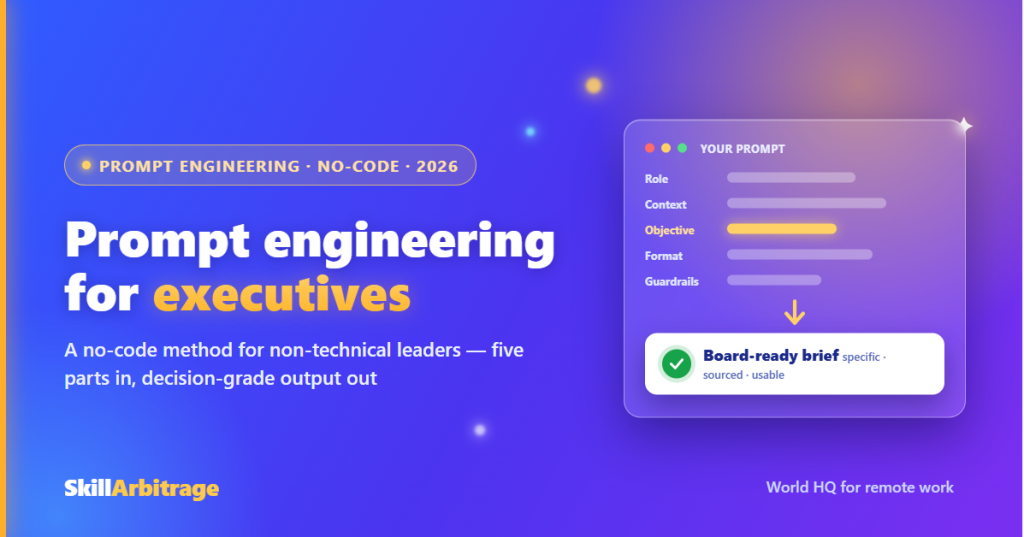
Strip away the jargon and a strong executive prompt has five parts. Learn them once and you’ll never stare at a blank chat box again. The parts are role, context, objective, output format, and guardrails, and each one closes a gap the model would otherwise fill with a guess.
Role tells the model whose seat to sit in. “Act as a CFO” produces a sharper financial read than “help me with these numbers,” and “act as a sceptical board member” surfaces objections you’d rather hear in private than across the table. Context is the raw material: the figures, the meeting notes, the strategy draft, the background to the decision. The more relevant context you give, the less the model invents, because you’ve left it less room to fill.
Objective is the exact thing you want, stated as an outcome rather than a topic. “Give me the three risks in this plan I should stress-test first, ranked by how much damage they’d do” beats “tell me about this plan.” Output format is where a lot of wasted time hides. Ask for “a one-page table: issue, why it matters, the question I should ask” and you get something you can act on. Leave it open and you get prose you then have to reorganise yourself.
Guardrails are the constraints that keep the answer honest: use only the material provided, write “not provided” instead of guessing, don’t invent figures or sources, and flag anything you’re unsure of. That last instruction alone removes a surprising share of the confident nonsense. Does every prompt need all five, every time? No. A quick “explain this term in plain English” needs role and context and little else. But for anything that touches a real decision, running the five parts takes ten seconds and saves you an hour of correcting a lazy answer.
1 |
Role Tell the model whose seat to sit in. “Act as a CFO” reads numbers very differently from “act as a head of sales” or “act as a sceptical board member”. |
2 |
Context Paste the figures, notes, draft, or background the task depends on. The more relevant context you give, the less the model has to invent. |
3 |
Objective State the outcome you want, not the topic. “Rank the three risks I should stress-test first” beats “tell me about this plan”. |
4 |
Output format Ask for the exact shape you’ll use: “a one-page table with issue, why it matters, and the question to ask”. Leave it open and you reorganise by hand. |
5 |
Guardrails Use only the material provided, write “not provided” when something is missing, don’t invent figures or sources, and flag any uncertainty. |
Three no-code techniques that sharpen any prompt
Once the anatomy is second nature, three techniques do most of the heavy lifting on harder tasks. None of them require any technical skill. They’re just structured ways of asking, and each maps to something you already do as a leader.

The first is showing an example, sometimes called few-shot prompting, which is a formal name for “show, don’t just tell.” Instead of describing the tone or structure you want, paste one or two examples of your own work, a past board note, an email you were happy with, and ask the model to match the style. Give it two updates you’ve written before and it will mirror your voice far more closely than any adjective could. You already brief people with examples of “the kind of thing I mean.” This is the same instinct, pointed at the tool.
The second is asking for the reasoning, sometimes called chain-of-thought prompting, and it’s the one that matters most for decisions. Ask the model to “work through this step by step: first list every assumption this plan depends on, then flag which assumptions are weakest, then say what would have to be true for the plan to fail.” Forcing the reasoning into visible steps surfaces issues a one-shot “is this a good plan?” glosses over. It also lets you check the logic, because you can see where the thinking went if it went wrong.
The third is assigning a persona, the close cousin of role. “Act as a veteran operator who has scaled three services firms and is known for spotting the hidden cost in a growth plan” primes the model toward a specific lens. Is the persona literally true? It doesn’t matter. What matters is that a sharp, specific persona pulls a sharper answer than a generic one, and that you can summon several: run the same strategy past a “cautious CFO,” then a “growth-hungry head of sales,” and read the tension between them. Which technique you reach for depends on the task, and part of the skill is knowing that.
8 ready-to-use prompts for executive work
Here’s the working toolkit, and this is the part worth bookmarking. Each of these is a full, copy-paste prompt built the way the anatomy section describes, not a one-line request you’ll have to babysit. Fill in the bracketed placeholders, paste in your material, and always run the verification step from the next section before anything reaches a board, a client, or a decision. They’re deliberately detailed, and that’s the point: the instruction you leave out is the gap the model fills with a guess.
One habit before you start. Where a prompt tells the model to flag uncertainty or mark something “[verify],” keep that line in. It’s tempting to trim it for a tidier answer, but that single instruction is what turns silent invention into a visible flag you can catch.
1. The board or investor brief. The failure here is a summary that reads smoothly and buries the one number that matters. This prompt forces the model to work from your actual figures and surface what a sharp director would seize on.
Act as an experienced CFO preparing me, the [CEO / MD], for a [board / investor] meeting. Work only from the figures and notes I paste below. Do not add any number, trend, or claim that is not in this material, and if something a director would expect to see is missing, say “not in the pack” rather than estimating it.
Give me: the three metrics that moved most versus the prior period, each with the actual figures and the direction; the single number a sceptical director is most likely to challenge, and the honest one-line answer I should have ready; and any figure in the pack that looks internally inconsistent or too good to be true, flagged for me to double-check before the meeting.
Present it as a one-page brief: a short “headline” paragraph of no more than four sentences, then a table with three columns, metric, what changed, and the question I should be ready for. Keep the language plain and direct; this is for me to speak from, not to circulate. Do not spin bad news into neutral language, and do not soften a real problem into “mixed performance.”
2. The strategy pressure-test. The most valuable thing AI can do for a leader is argue with a plan before the market does. This prompt turns the model into a structured red team instead of a cheerleader.
Act as a hard-nosed strategy adviser whose job is to find the holes in my plan, not to reassure me. Here is the plan or decision: [paste it, with the reasoning behind it]. Work through it step by step rather than giving a verdict up front.
First, list every assumption the plan depends on, including the ones I’ve left unstated. Second, rank those assumptions by how much the plan relies on each one and how likely each is to be wrong. Third, describe the two or three most plausible ways this plan fails, and what early warning sign would tell me each one is happening. Fourth, name the one thing I could test cheaply, in the next 30 days, that would most reduce my uncertainty.
Be specific and concrete; “market conditions could change” is useless, “this assumes we keep the current 3-week delivery time as volume doubles, which has never been tested” is useful. Do not invent facts about my business, my market, or my competitors; where you need information I haven’t given you, state the assumption you’re making and flag it. End with the single hardest question you’d ask me if you sat on my board.
3. The market or competitor scan. A generic scan gives you what everyone already knows. The danger is worse than useless: the model will confidently state a competitor’s revenue, a market size, or a “recent” development that it has half-remembered or made up. This prompt puts every claim on a leash.
Act as a market analyst briefing me on [market / competitor / trend]. Give me a structured scan covering: the main players and how they position themselves, the shifts underway in this space, and the two or three implications most relevant to a business like mine, which is [one line on your business].
Treat every specific fact, figure, market size, competitor detail, funding event, or date as unverified by default. For any such claim, mark it “[verify]” and, where you can, name the kind of source I should check it against. Do not state a revenue figure, a market size, or a recent event as fact unless you are genuinely confident, and never invent a statistic, a company name, or a date to make the briefing look more complete. Three things you’re sure of are worth more to me than ten you’re not.
Separate what is broadly established from what is your interpretation, and label your interpretation as such. Where the picture is genuinely uncertain or the data is thin, say so plainly instead of papering over it. Finish with the three questions I should get answered from primary research before I act on any of this.
4. The decision memo. When you’re weighing options, a wall of “on the one hand” prose is the enemy of a clean decision. This prompt lays the options out so you can actually choose.
Act as a chief of staff helping me decide between options. The decision is: [state it]. Here are the options I’m weighing and what I know about each: [paste them]. Here is what I’m optimising for, in priority order: [e.g. speed to revenue, then cash risk, then team stretch].
Build me a decision memo. Start with a one-paragraph statement of the decision and the criteria. Then give a comparison table with one row per option and columns for the criteria I named, plus a column for the biggest risk of each. After the table, write a short “if I had to choose today” recommendation with your reasoning, and be explicit about which of my own criteria your recommendation is trading off.
Do not invent facts about the options beyond what I’ve given you; where a comparison needs information I haven’t supplied, mark it “[need to confirm]” rather than filling it in. Steel-man the option you don’t recommend in two lines, so I can see the strongest case against your own suggestion. Keep it to a single page.
5. The difficult message. Sensitive communications are where accuracy quietly dies: the model “improves” a carefully hedged message into a promise or an apology you didn’t intend. This prompt keeps the tone right without letting go of your meaning.
Help me write a [email / message] to [recipient, e.g. a key client / my leadership team / an investor] about [situation]. Here are the points I need to make and the outcome I want: [paste them]. Here is the tone I want: [e.g. calm, accountable, and firm, not defensive and not grovelling].
Draft it in under [X] words. Lead with the thing they most need to know, not with throat-clearing. Preserve every point I listed and do not add commitments, admissions, apologies, or opinions I did not include; if I’ve hedged something, keep the hedge rather than rounding it up into a promise. If a point I’ve asked you to make would read as legally or reputationally risky, flag it to me separately rather than silently softening it.
Give me two versions: one slightly warmer, one slightly more direct, so I can choose the register. Do not invent any fact about the situation, and leave a clear placeholder for anything I need to fill in, such as [date] or [specific commitment]. End with a one-line note on anything in my points that a careful recipient might misread, so I can pre-empt it.
6. Meeting notes to an action list. The gap between a good meeting and nothing happening is usually the follow-up nobody wrote down. This prompt turns a messy transcript or your scribbled notes into owned, dated actions.
Act as my executive assistant. Below are the raw notes or transcript from a meeting: [paste them]. Turn them into a clean output for me, working only from what’s actually in the notes.
Produce three things. First, a five-bullet summary of what was decided, not what was discussed, so an absent leader could catch up in a minute. Second, an action table with columns for the action, the owner, and the deadline, capturing every commitment made; where an owner or a deadline wasn’t stated, write “owner not assigned” or “no date set” rather than guessing who or when. Third, a short list of open questions or decisions that were raised but not resolved.
Do not invent actions, owners, dates, or decisions that aren’t supported by the notes, and do not merge two different points into one to make the list tidier. If the notes are ambiguous about who agreed to what, flag the ambiguity instead of resolving it yourself. Keep it scannable; this is going out to people who were in the room and will notice if you get it wrong.
7. The numbers, explained. Leaders often need to understand a report from a function they don’t run, or explain one upward, without pretending to expertise they don’t have. This prompt makes the model a translator, not an inventor.
Act as a patient analyst explaining a report to a smart non-specialist, me. Here is the report or the set of figures: [paste it]. I am [your role] and I am not a [finance / data / technical] specialist. Explain, in plain English, what this is actually telling me and what I should pay attention to.
Cover: the two or three things in here that most affect a decision I might make; anything that looks unusual, off-trend, or worth questioning; and the questions I should ask the person who produced this. Define any technical term the first time you use it, in a few plain words.
Work only from the numbers I’ve given you. Do not calculate a figure I haven’t provided the inputs for, and if a conclusion would need data that isn’t here, say what’s missing rather than estimating. If two figures in the report seem to contradict each other, point it out instead of smoothing it over. Do not dress up a guess as a finding; where you’re inferring rather than reading directly off the data, say so.
8. The role brief and interview questions. Hiring for a role you’ll manage but haven’t done yourself is a common executive trap. This prompt helps you define the role and interrogate candidates without faking domain depth.
Act as an experienced hiring manager helping me define and hire for a [role title] who will [what the role is for], reporting to [whom]. I understand the business need but I’m not a deep expert in this function, so help me hire well without pretending to be one.
Give me: a short scorecard of the five to seven outcomes this person must deliver in their first year, written as results rather than tasks; the three or four capabilities that actually predict success in this role, with a one-line note on how each shows up in real work; and, for each capability, one or two interview questions that would reveal whether a candidate genuinely has it, along with what a strong answer versus a weak answer sounds like.
Base the capabilities on what the role genuinely requires, and where a specialist judgement is beyond what I’ve told you, flag it as “[confirm with a specialist]” rather than asserting it confidently. Do not invent salary figures, market benchmarks, or credentials as if they were established; if I’d benefit from a benchmark, tell me what to look up. Keep the whole thing to two pages.
Notice what every one of these has in common: a defined role, real context, a specific objective, a fixed output format, and an anti-invention instruction baked into the body. That’s the anatomy from earlier, working at full length. The reason each one runs long is that every extra constraint closes a door the model would otherwise wander through. Building this kind of structured, safety-first prompting into how you work is exactly the skill that separates leaders who get fluent noise from AI and leaders who get decision-grade help, a theme we come back to in our guide on how senior professionals stay relevant as AI reshapes their work.
Guardrails: what a leader must never delegate to a prompt
A prompt can make AI more useful. It cannot make AI accountable, and at your level, accountability is the whole job. Three guardrails matter more than any clever phrasing, and none of them are optional.
The first is confidentiality. The single most common serious mistake leaders make is pasting sensitive material, unreleased financials, a live deal, a personnel matter, customer data, into a free public chatbot that may use it to train future models. Before anything goes into a tool, ask two questions: is this information I’d be comfortable leaking, and is this tool one my organisation has actually approved for this kind of data? If the answer to either is no, don’t paste it. Strip out names and identifying details, or use a sanctioned, contractually covered tool instead. Where you’re setting the rules for others as well as yourself, our guide on driving AI adoption across teams covers the one-page policy that keeps a whole team safe.
The second is verification. A model produces fluent, well-structured, completely wrong output with no signal that it’s wrong, because it doesn’t know when it’s guessing. So the rule is simple: every figure, name, citation, or fact an AI hands you is a lead to confirm, never a fact to use. Pull the primary source. Check the number against the actual report. This one discipline catches almost every failure that would otherwise become an embarrassment in a board pack or a client email.
The third is the human-only line. Some judgements don’t get delegated to a model, full stop: who to let go, whether to sign the deal, what to tell the board when the news is bad, how to weigh a risk that could sink the company. AI can inform those decisions by laying out options and pressure-testing your thinking. It cannot own them, because it carries none of the consequences. Use it to think better, then decide yourself. That division of labour, machine for speed and structure, human for judgement and accountability, is the entire philosophy behind using these tools well, and it’s the same principle we explore in our piece on whether AI will replace experienced professionals.
Common mistakes non-technical leaders make
Most prompting failures fall into a handful of repeat offenders. Recognise them and you’ll dodge the majority of bad output. What’s the most common one? Trusting a fluent answer because it sounds right. Confidence is the model’s default register, not a signal of accuracy, and a smooth paragraph of invented figures is exactly how a leader ends up quoting a number in a meeting that doesn’t exist.
Close behind is being vague and then blaming the tool. “Give me some ideas for growth” gets you a listicle any consultant could produce in their sleep, because you asked a generic question and got a generic answer. The fix is the whole method in this guide: role, context, objective, format, guardrails. A leader’s instinct to brief a person clearly is exactly the instinct a good prompt needs, and most people who “can’t get anything useful out of AI” simply haven’t briefed it the way they’d brief a capable new hire.
The third mistake is treating the first answer as the final one. Strong prompting is a conversation, not a single command. You draft, you push back, you narrow, you ask again: “that’s too generic, focus only on the cash risk,” or “rewrite this assuming the reader is hostile.” That loop is where the good output actually comes from, and skipping it is why so many leaders conclude the tool is shallow when it was really just under-directed.
The quieter mistakes still cost you. Never specifying an output format, then reformatting everything by hand. Dumping a huge document in with no instruction about what to do with it. And over-relying on the tool for judgement it can’t carry, which loops back to the guardrails above. None of these are technical failures. They’re briefing failures, and briefing is a skill you already have as a leader. Pointing it at a machine is the only new part, and it’s the part this guide, and a structured programme, can teach fast.
A 30-day plan to build the prompting habit
Reading about prompting won’t make you good at it any more than reading about golf lowers your handicap. The skill is built through reps on your real work, and a month of small, deliberate practice is enough to make it automatic. Here’s a plan that costs no budget and about ten minutes a day.
Week one is about the anatomy. Take the five-part template from the top of this guide and use it on three real tasks you’d normally do yourself, a summary, an email, a scan. Force yourself to write out role, context, objective, format, and guardrails every time, even when it feels slow. The goal isn’t speed yet, it’s building the structure into muscle memory so you stop firing off one-line requests.
Week two adds iteration. Take last week’s outputs and push back on them: “too vague,” “wrong tone,” “focus only on X,” “now argue the opposite.” Notice how much better the second and third answers are than the first. This is the week you learn that the conversation, not the opening prompt, is where the value lives. Week three adds the techniques: show the model an example of your own work, ask it to reason step by step on a decision, and try running one plan past two different personas. Week four is about locking it in, using prompting on your highest-value recurring work, the weekly update, the monthly review, the standard client message, so the habit attaches to things you do anyway.
By the end of the month you’ll have a personal library of prompts that work for your role, and the instinct to structure a request without thinking about it. That’s the point at which this stops being a technique you apply and becomes just how you work. From there, the natural next step is helping the people around you get there too, which is a different skill built on change management rather than personal fluency, and one worth doing deliberately rather than by decree.
W1 |
Master the anatomy Use the five-part template, role, context, objective, format, guardrails, on three real tasks. Write out all five every time, even when it feels slow. |
W2 |
Add iteration Push back on last week’s answers: “too vague,” “wrong tone,” “focus only on X,” “now argue the opposite.” Learn that the conversation beats the opening prompt. |
W3 |
Layer the techniques Show the model an example of your own work, ask it to reason step by step on a real decision, and run one plan past two different personas. |
W4 |
Lock it into your work Apply prompting to your highest-value recurring tasks, the weekly update, the monthly review, the standard client message, so the habit attaches to work you do anyway. |
Frequently asked questions
What is prompt engineering for executives? It’s the skill of writing clear, structured instructions that get useful, decision-grade output from AI tools, aimed at non-technical leaders and requiring no coding. The core method is a five-part prompt: state the role the model should play, give it the real context, name the exact objective, specify the output format, and set guardrails that force it to flag uncertainty rather than invent facts. Done well, it turns a general-purpose chatbot into something closer to a fast, tireless chief of staff.
Do I need any technical or coding skills to prompt AI well? No. Everything in this guide is done in plain language, in the same chat box anyone uses. Prompting is far closer to briefing a capable new hire than to programming: if you can write a clear instruction to a person, you can write a clear prompt. The skill is structure and specificity, not syntax, which is why leaders who feel “non-technical” often become strong prompters quickly once they stop asking one-line questions.
Why do I get generic, unhelpful answers from AI? Usually because the prompt is generic. A vague question invites a vague answer written for an average reader with no stake in your situation. Add the five parts, role, context, objective, output format, and guardrails, and the same tool produces something specific to your decision. Most people who conclude AI is shallow simply haven’t briefed it the way they’d brief a competent assistant.
Is it safe to put company information into AI tools? Only with care. Never paste confidential material, unreleased financials, live deals, personnel matters, or customer data into a free public chatbot that may train on it. Before entering anything, confirm it’s information you’d be comfortable exposing and a tool your organisation has approved for that data; otherwise strip identifying details or use a sanctioned, contractually covered tool. Confidentiality is a guardrail no prompt can replace.
Can I trust the numbers and facts an AI gives me? Not without checking. Generative models produce figures, names, and claims that look authoritative but may be wrong or invented, with no signal that they are. Treat every fact an AI hands you as a lead to verify against a primary source, never a fact to use directly. This single verification habit prevents most of the errors that would otherwise reach a board pack, a client, or a decision.
Which AI tool is best for executive work? There’s no single best tool, and prompt quality matters more than brand. Use a public consumer model only for non-confidential work, and switch to a tool your organisation has approved, with proper data protections, the moment real company information is involved. A well-structured prompt on a capable general model will beat a lazy prompt on the most advanced one, so invest in the skill before agonising over the software.
How is prompting different from the technical side of AI? Prompting is instructing a ready-made model through the words you type, which is what almost every leader needs. The technical side, things like fine-tuning or building custom systems, requires engineering resources and is rarely necessary for individual executive work. For the overwhelming majority of leaders, better prompting delivers far more value than any technical project, at zero coding cost.
How long does it take to get good at prompting? Faster than most people expect, because you’re building on skills you already have. A focused month of ten-minute daily reps on your real work, using the five-part structure, then adding iteration and the core techniques, is enough to make it automatic. The skill is built through practice on actual tasks, not through reading, so the sooner you prompt on real work the sooner it sticks.
Is prompting a personal skill or something I roll out to my team? Both, in that order. First get personally fluent, because a leader who can’t prompt well can’t credibly lead others to. Then rolling it out to a team is a separate skill built on change management, training, and governance rather than personal technique. For that next step, see our companion guide on how senior leaders drive AI adoption across their teams.
References
Research & data
- The State of AI: how organizations are rewiring to capture value: McKinsey & Company, 2025
- AI at Work 2025: Momentum Builds, but Gaps Remain: Boston Consulting Group, 2025
This article is for informational and educational purposes only and does not constitute professional, legal, financial, or management advice. AI tools, capabilities, and data-protection rules in this area are evolving; verify the current position and consult a qualified professional before acting on any strategy, hiring, compliance, or governance decision. Related reading: AI for professional work: how to delegate smarter (LawSikho) and using AI for enhanced operational insights (iPleaders).



 Allow notifications