
This blog will help business owners and marketers learn how they can use AI to handle common sales objections, respond faster and smarter, and close more deals without sounding robotic or pushy.
Table of Contents
Introduction
“Anything you say can and will be used against you in the court of law.” You’ve probably heard that line before. But let me flip it. In sales, it goes like, “Anything the customer says can and should be used to close the deal.” Especially when it comes to objections.
The best salespeople don’t fear objections. They use them. They listen to what the buyer says, like “I’ll think about it,” “It’s too expensive,” “Not sure if it’s the right time” and instead of freezing or defending, they turn those objections into the exact reason to say yes.
Now here’s where it gets interesting. You can actually train AI to do the same thing. When I first started using AI, I didn’t think much of it. I thought, yeah, it can write emails or generate ideas.
But objections? No way. That needs real human judgment. That needs sales experience. That needs emotional reading. But I was wrong. Because the problem wasn’t AI. The problem was how I was using it.
At the time, I was handling all objections manually. Every call felt like a fresh fight. I’d try different replies. Some worked. Some didn’t. There was no system. No consistency. And it drained my energy.
Then one day I thought, what if I just feed all my best replies into AI? My tone, my logic, my emotion. Not to replace me. But to help me. So I did. And what came out was wild.
AI started giving me clean, confident, real-sounding responses to every objection. I just had to tweak and use them. No second-guessing. No overthinking. Just open, copy, and send. And guess what? Objections that used to kill my deals, now started closing them.
So if you’ve ever felt stuck when a buyer says, “Let me think about it” or “This is too expensive,” or if you’re tired of repeating the same things over and over again, then this might be your next big unlock.
Let me show you how to actually use AI to handle objections and close more deals without sounding robotic, without guessing, and without wasting hours writing replies from scratch. But first, let’s talk about why using AI for objections is a game-changer.
What happens when you let AI handle sales objections for you?
Some business owners think AI is only meant for writing content or saving time. But the smart ones who close more deals know that AI is a sales weapon.
They treat AI as a tool that can help them respond faster, handle objections better, and remove hesitation at the exact moment when a deal is about to slip away.
That’s why the businesses that use AI in their sales process are growing faster, while the rest keep getting stuck in the same loop of manual replies and lost conversions.
- AI helps you understand which objections are coming up most often, so you know exactly what’s stopping people from buying and what needs to be fixed in your pitch or offer.
- Instead of thinking of a new reply every time, you can use AI to generate smart, personalised objection responses in seconds, written in your tone and logic.
- You can plug your past sales conversations into AI and train it to reply just like your best closer, so even new team members can handle objections like a pro.
- You can respond to objections instantly on emails, chats, or calls without delays, and that fast response builds trust with the buyer.
- You can reduce the emotional pressure during tough sales conversations because AI gives you calm, confident answers when you need them most.
- You can handle more leads without burning out, because AI does the heavy lifting on repetitive objections, so you can focus on closing.
- You can turn a lost lead into a win by using AI to follow up with the right objection-handling message at the right time, even days later.
These are just a few of the reasons why using AI to handle objections can completely change how you sell. These alone are enough for any business owner to seriously consider adding AI into their sales process.
If you’re now interested in learning how to actually use AI to handle objections and close more deals, let me show you the full step-by-step system that can work for almost any business, product, or sales team.

Step 1: Build a library of common objections
Most people want AI to magically fix their sales problems. They think if they just tell it, “Handle this objection,” it’ll come up with the perfect response. But the reality is that AI has no clue what your customers are actually saying.

It’s not on your sales calls. It’s not reading your email threads. It doesn’t know why people hesitate, stall, or ghost. So if you don’t give it real objections to work with, it’ll just guess. And those guesses? They’ll sound flat, generic, and completely disconnected.
That’s where most people go wrong. They expect smart answers from an AI that’s working with zero context. And that’s why this step matters so much. Because objections aren’t random. They repeat.
And when you start spotting those patterns, you can build replies that sound personal, even though they’re systemized. That’s how you close faster. That’s how you stop scrambling every time someone says, “Hmm, let me think about it.”
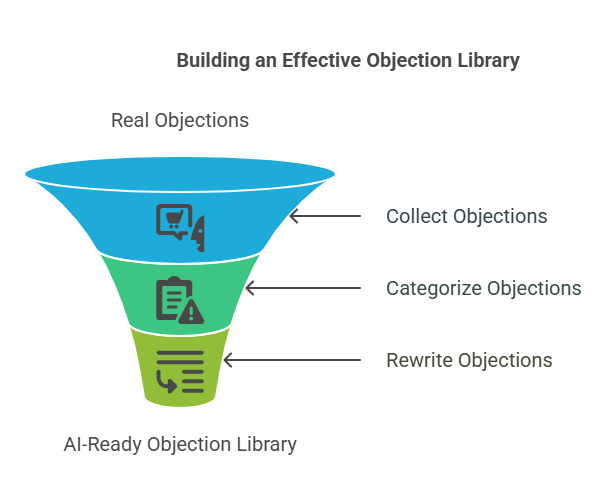
Your goal here is to build a simple objection library that will be a clean list of real objections your prospects raise, grouped by the real reason behind them, and rewritten in a way that feels sharp, human, and easy to plug into AI. Here’s how to do it:
1. Collect real objections from your past conversations
Don’t try to remember objections from memory. Just go pull them from where they already exist, like your CRM notes, Zoom transcripts, email threads, WhatsApp chats, even support tickets.
Anywhere someone hesitated, said “maybe later,” or asked a tough question, that’s your raw material. If you have a team, ask each rep to send you the top 10 objections they keep hearing.
If you’re solo, just go through your last 10–15 leads and write down the exact phrases people used when they pulled back. Not summaries. Not your version. Their version.
For example: “This feels expensive compared to what we’re already using.” That’s the kind of line you want to keep exactly as it is. The phrasing matters later. AI needs to learn how real people talk, not how marketers paraphrase.
2. Sort them into simple root-level categories
Once you’ve gathered a solid batch (aim for 15–20), start grouping them. Most objections boil down to a few root causes, like price, timing, authority, competitor comparisons, lack of trust, or missing features. Use those as your buckets. Keep it simple. For instance:
- “We need to run this by our CEO,” goes under Authority
- “We’re happy with our current tool” goes under Competitor
- “Not sure this will actually help us grow” goes under Trust
This part isn’t just for organization. It’s what makes your prompts powerful later. You’ll stop reacting to surface-level phrases and start responding to what’s really holding the deal back.
3. Rewrite each objection so it’s clean, short, and still sounds like the buyer
Now go back through your list and clean up the language. Don’t make it fancy. Don’t try to “polish” it. Just make it clear and easy to read. Keep the tone natural, like how someone would actually say it if they weren’t rambling. For example:
Original: “Uhh, honestly, we’re just kinda used to our current CRM and not sure if this will make a big enough difference.”
Cleaned version: “We’re comfortable with our current CRM and not sure if switching will be worth it.”
Category: Competitor
This version is easier to understand, but still feels like something a real human would say. That’s the balance you want. And once you’ve got that, congrats. You’ve built your working objection library.
This doc becomes your cheat code. Every time a buyer pushes back, every time you need to train the AI to respond better, this is what you feed it. Without this, you’re just winging it. With it, you’re building replies based on real hesitation patterns. Don’t skip this step.
It’s boring and takes time, but it gives you leverage. Because once you’ve got this in place, every reply you write will land better. It won’t sound robotic. It’ll sound like you actually get what the buyer is worried about. And that’s what makes them trust you enough to say yes.
Step 2: Train an AI tool on your sales materials
Most people think that if they just open up ChatGPT and type, “Handle this objection,” magic will happen. But what really happens? They get something that sounds okay on the surface, but when they actually try using it in a real sales convo, it falls flat.
The reply feels vague. The tone doesn’t match. The reasoning is weak. And the buyer doesn’t buy. Why? Because AI doesn’t know your business. It doesn’t know what you sell, how you position it, what makes it special, or what your customers care about.
It’s like hiring a sales rep who never went through onboarding and then asking them to handle your toughest leads. You already know how that ends. So if you want AI to actually help you close deals, not just generate pretty sentences, you’ve got to train it properly.
And no, this doesn’t mean you need fancy tech skills or weeks of work. It just means treating the AI like a real team member and giving it the info it needs to talk like you, think like you, and sell like you.
Your goal here is to feed the AI with your sales materials like your pitch decks, email scripts, product sheets, and case studies so it actually learns your positioning, your voice, and your sales logic. That’s how you make sure its replies hit the mark.
1. Pick the right AI tool and set it up the smart way
Not all tools are created equal. You want something that allows detailed prompting or custom training. GPT-4 (especially the custom GPT version), Claude, Jasper, Copy.ai, all work well. The point isn’t which tool you use, it’s how deeply it can understand your material.
If you’re using ChatGPT, don’t just open a blank chat. Create a custom GPT and upload your sales documents directly into it. That way, it actually remembers your offer and messaging instead of treating every prompt like a brand-new conversation.
For example, if you sell HR software to mid-size companies, raw ChatGPT won’t know your core selling points. But once you’ve trained it, it’ll know how to weave in phrases like “automated compliance tracking” or “paperless onboarding workflows” when replying to objections, just like a trained sales rep would.
2. Feed it the exact sales material a new rep would need
Think of this step like onboarding a new salesperson. What would you send them to study? That’s what the AI needs. Drop in your pitch decks, pricing sheets, product brochures, sales emails, FAQs, case studies, and if you have them, transcripts of past sales calls.
Don’t just dump everything in one go. Upload them piece by piece and tell the AI what each one is. Like, “Here’s our main product sheet,” or “This case study shows how we helped a logistics company reduce manual reporting.”
This small move, explaining what each file is, helps the AI understand context and use it better when replying to objections later.
3. Teach it how to think like your sales team
Once the material is in, start treating the AI like your assistant. Give it mock scenarios and ask it to respond using what it’s just learned. Don’t just say, “Handle this objection.” Be specific.
Say, “You’re a sales rep at [your company]. A buyer says, ‘Your tool seems expensive.’ Based on our case studies and product sheet, write a confident response that compares ROI.” That’s how you get a reply that doesn’t sound like generic fluff.
4. Save and organize the best replies for future use
Once the AI starts producing solid replies, save the best ones. Build a doc or spreadsheet where you group them by objection type, like Price, Competitor, Trust, Feature, etc. This turns into your internal objection playbook.
You can use it later to train new reps, improve future AI prompts, or just copy-paste the best lines during real conversations. It also becomes your safety net. When a tough objection comes up, you don’t panic. You already have a smart, trained response ready to go.
And that’s it. Now AI isn’t just writing cute sentences, but it’s thinking like someone who knows your product, your customer pain points, and your value prop. That’s what makes it powerful.
Most people skip this and wonder why the AI sounds robotic. But when you put in the effort to actually train it with your own material, it becomes an extension of your sales brain. This is the part that turns AI into a real sales asset.

Step 3: Use AI to generate objection scripts
Most people think objection handling is about being quick on your feet. That you just need to “think fast” and say the right thing in the moment. So they keep winging it.
Every time a buyer pushes back, they pause, get nervous, or go blank and then either ramble, drop the price, or just say, “Okay, I’ll follow up later.” And that’s how good leads die. Not because your product isn’t strong.
But because your reply didn’t land. It wasn’t confident. It didn’t reframe their thinking. It didn’t move the deal forward. So the buyer leaves the conversation still stuck on the same fear they came in with. This step is where that changes.
The mindset shift here is simple: Don’t wait for the objection to come up. Handle it before it does, by preparing strong, tested responses that AI can generate for you at scale.
1. Give AI a clear, contextual prompt, not a vague one
Start by picking one objection from your library. Let’s say under Pricing, you choose: “It’s too expensive.” Don’t try to generate replies for everything at once. Focus on one objection at a time so the AI can go deep and stay relevant.
Then feed it a detailed prompt, not just “Write a reply to this.” You want to guide it like a sales manager would train a new rep. For example:
“Write a confident response to: ‘Your product is too expensive.’ Mention that we offer built-in time tracking, advanced reporting, and onboarding support. Include a stat from the case study that shows a 20% time saving. Tone: professional.”
You can also ask it to give you a few variations, one bold, one casual, one empathetic, so you can see which one fits your sales style best. Be specific, and it’ll give you gold.
2. Repeat this for every objection until you’ve built depth
Once you’ve got a solid reply for one objection, move on to the next. Do this for every major objection you sorted in Step 1. If someone says, “We already use another tool,” ask for a reply that highlights your biggest USP and why switching is worth it.
By the time you finish this process, you’ll have 30 to 50 strong, reusable responses, all grounded in real objections and real value. That’s how you build confidence at scale.
3. Organize all replies into a clean objection playbook
Now that you’ve got a batch of responses, it’s time to organize them so your team (and your future self) can actually use them. Create a doc or Notion page and split it by objection category: Pricing, Timing, Trust, Competitor, Authority, Feature.
Under each category, paste 2–3 of your best AI-generated responses. If needed, tag where they work best, whether email, call, or DM. This isn’t just a swipe file. This is your real-time sales assistant.
It becomes the playbook that new reps use to get trained, that you use to automate follow-ups, and that keeps your message consistent across the board.
4. Test new formats to match how you sell
Here’s where it gets interesting. Don’t just stick to full-paragraph replies. Ask AI to write the same response as a 1-line email, a WhatsApp message, or even a voice note script. For example:
“Turn this into a short DM I can send to someone who ghosted after asking about pricing.” This gives you format-specific scripts you can plug into your sales flow right away, no extra editing, no friction.
And that’s how you turn raw objections into responses that actually convert. When you have these replies ready, you don’t sound defensive or unsure. You sound prepared. Like someone who knows exactly why their product is worth it and has the words to back it up.
Most people never do this. They treat objections like surprises instead of patterns. But if you slow down and build this once, you stop scrambling every time a buyer pushes back.
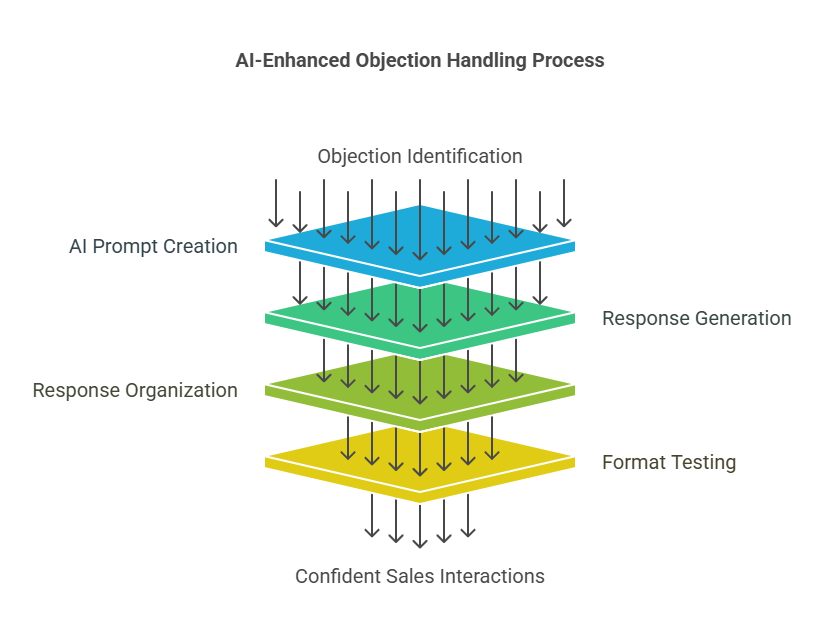
Step 4: Test and improve the AI’s responses in real scenarios
Just because a reply looks smart in a doc doesn’t mean it’ll work in a real sales conversation. That’s where most people mess up. They write their AI replies once, feel good about how they read, and move on. But objection handling isn’t about clever writing.
It’s about whether that reply shifts the buyer’s mind in a real situation, when they’re skeptical, unsure, or on the verge of walking away. If you don’t test what you’ve built, you’re just guessing.
Some buyers need logic. Some need emotion. Some want reassurance. Others want proof. And no AI tool, no matter how smart, can magically guess what tone to use unless you’ve already tested what works.
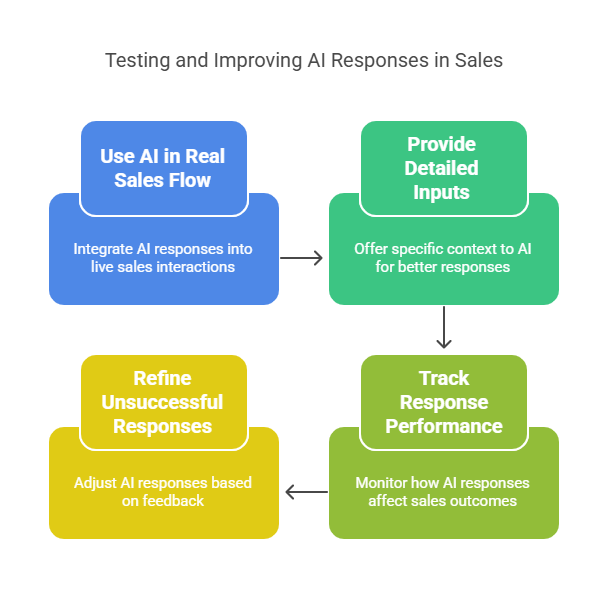
Your goal here is to treat every AI-generated response like a draft and improve it by testing it in real conversations, tracking what works, and refining the weak spots until your whole system is tight. Let’s break it down:
1. Use AI inside your real sales flow
Decide where and how you’ll start testing AI replies, whether on emails, WhatsApp chats, DMs, Zoom calls, or anything where objections show up.
If you’re on a call and someone says, “We already use another tool,” switch tabs, ask AI for a sharp comeback that highlights your USP, and try it live.
If you’re writing a follow-up email and stuck on what to say when they ghosted after a pricing discussion, ask the AI for a reframe that focuses on value.
That’s how you get live data on what lands and what doesn’t by actually using it while selling, not sitting on it like a saved script.
2. Give better inputs if you want better outputs
The biggest reason AI responses fall flat is that people don’t give context. But if you want something that feels sharp and human, you have to talk to AI like you’re briefing a junior rep.
Tell them who the buyer is, what they care about, what they’re using now, and what their concern is. For example:
“We’re talking to the founder of a bootstrapped SaaS. He’s comparing us to a cheaper tool but hates their support. How do we position our 1-on-1 onboarding and faster implementation?” Now the AI isn’t guessing. It’s writing like it knows the deal.
3. Track what replies actually move the deal forward
Once you’ve started using AI-generated responses in the wild, track how each one performs. You don’t need a dashboard or a full CRM report, but just a running doc or spreadsheet. Log the objection, paste the AI reply you used, and write what happened next.
This gives you visibility. You’ll start spotting patterns like which tones are working, which replies get ignored, and which logic is actually landing with different buyer types.
4. Refine the ones that didn’t land
Not every response will be a winner. That’s fine. The whole point is to test, learn, and improve. If a certain reply didn’t move the conversation forward, prompt the AI again. Ask it to rewrite using a more empathetic tone.
Or flip the logic and try social proof instead of ROI, or focus on long-term partnership instead of features. For example:
“Rewrite this objection reply with fewer numbers and more focus on what kind of ongoing support we give, so it feels more human and less salesy.” Now you’re not just collecting responses, but you’re evolving them based on real feedback.
And now, you’ve got more than just a smart AI script. You’ve got a tested, adaptable objection-handling system that actually performs under pressure.
You’re not sitting around wondering what to say when a deal stalls because you’ve already tried, tracked, and tuned what works. That’s what gives you speed and confidence.
Step 5: Keep your AI sales playbook updated
Most people treat AI like a fire-and-forget tool. They feed it some info once, get a few good responses, and never update it again. That’s fine if your business never changes.
But if you’re actually growing like releasing features, testing offers, and building new case studies, then sticking with the same old inputs is like handing your best rep a 6-month-old pitch deck and telling them to wing it.
The problem is, buyers notice. They hear the same outdated proof, the same old objections being answered with half-truths, and it starts sounding like you’re not really paying attention. That’s when deals slip.
Not because your offer isn’t strong, but because your messaging didn’t reflect what it could be. What most people miss is that AI is only as good as what you teach it. And what you teach it needs to evolve if you want your sales process to keep improving.
Your goal here is to keep your AI trained on the most up-to-date, high-leverage sales material, so it always replies with relevance, credibility, and clarity. Let’s walk through how to keep that system sharp:
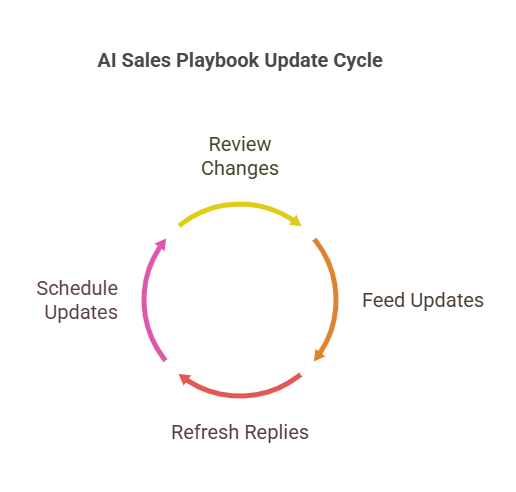
1. Review what’s changed since the last update
Every 30 days, pause and look at what’s new. Has a client sent you a great testimonial? Did your team release a new feature? Have you seen new objections pop up on sales calls?
These changes might feel small, but they add up, and if your AI doesn’t know them, it’s still operating in the past. For example:
If you just launched a self-serve analytics dashboard and prospects keep asking about ease of use, that’s your cue. Pull out that update, write it down, and make a list of what needs to be added to your AI training.
2. Feed those updates into your AI clearly
Now that you’ve got the updates, don’t just dump them into your AI tool but guide it. AI doesn’t think, it follows instructions. So instead of pasting a full case study, say, “Use this when replying to people who say onboarding takes too long.”
Or if your pricing changed, tell it, “Replace all previous references to our ₹__ plan with this new structure.” That’s the part most people overlook, but it’s not just about uploading info, it’s about shaping how the AI uses it.
3. Refresh your objection replies where needed
Once your AI has the new information, revisit your objection playbook. Start with the top 5 objections you hear most. Skim the replies. If anything feels outdated, too vague, or missing a new angle, fix it.
For example, maybe your old response to “You’re more expensive” focused on premium support. But now you have stronger automation features too. Add that in. Don’t let great new advantages stay hidden just because the reply was written two months ago.
4. Set a recurring date to do this every month
The key to keeping your AI sharp isn’t doing this once, but it’s doing it consistently. Block 30 minutes on your calendar every month. Make it a habit. Open your notes, check your updates, run a few prompts, refresh the objection doc, done.
And if you really want to make it effortless, keep a rolling list of updates throughout the month so you’re not starting from scratch every time.
And that’s how you stop your AI from going stale and start using it like a top-performing sales rep. One that never forgets, always adapts, and gets sharper every month. It doesn’t just help you reply, but it grows with your business and reflects your evolution in real time.
Most people build once, then leave it alone. But if you do this step right, you’re no longer using AI like a temporary shortcut. You’re turning it into a long-term advantage with a system that evolves, adapts, and scales with every new win your business creates.
Conclusion
Most business owners think handling objections is about having the perfect line or hiring a better salesperson. So they keep trying harder, guessing replies, or copy-pasting from competitors, and still losing deals. That’s exactly where they go wrong.
The best businesses don’t just respond to objections, but they use AI to prepare in advance and handle them better than any human ever could. Every hesitation, question, and “let me think about it” is a sales opportunity in disguise if you’re ready with the right response.
- Is your lead saying it’s too expensive? Show them the value before they bring it up.
- Are they unsure if it’ll work for them? Give them proof while they’re still deciding.
- Already using someone else? Make your difference crystal clear.
From now on, you don’t need to fumble through objections or rely on guesswork. You’ve got AI trained with your exact voice, your exact logic, and your best material, ready to close with you. Remember what I said earlier?
“Any objection the customer gives can and should be used to close the deal.”
Frequently asked questions (FAQs)
- Can AI really handle objections that well? Don’t buyers want human responses?
Yes, and yes. That’s why you’re not using AI to replace humans, but you’re using it to prepare better human responses. Most people freeze or fumble when objections show up. AI helps you plan the reply, tailor it, and deliver it with confidence, whether it’s through email, chat, or said aloud. The more context you give it, the more “you” it sounds. And buyers care more about getting a smart, clear response than whether it was first drafted by AI or not.
- Can I use these AI replies in cold outreach too? Or just for handling objections?
Start with objections, then expand. Once the AI understands your voice and pitch, you can absolutely use it to write cold emails, DM intros, or follow-ups. In fact, your objection replies often become your best cold email angles. For example, if most people say “It’s too expensive,” lead your email with: “Most companies think our tool’s too expensive until they see how it saves them ₹__ every month.” That’s how objection handling and cold outreach start feeding into each other.
- What’s the biggest mistake to avoid when using AI for objection handling?
Using it like a copy-paste machine. The people who get the worst results are the ones who expect AI to magically “just know” what to say. The people who win are the ones who guide it like a teammate, giving it context, feedback, and updates. If you treat AI like a junior sales assistant and train it right, it’ll become one of the sharpest closers in your toolkit.
- What tone should I use when generating replies with AI?
Whatever tone you normally sell in. That’s the point. AI can match tone, whether friendly, bold, casual, or professional, but only if you tell it. If you’re selling a premium B2B service, maybe you want confident and value-driven. If you’re in D2C or creative services, maybe warm and helpful works better. Test a few tones on the same objection and see what your audience responds to best. There’s no “right” tone, as there’s just what works for your buyer.
- Is this worth doing if I don’t get that many objections?
Yes, especially then. Because even if you only hear 5 objections a month, those 5 are probably killing 50% of your pipeline. Fixing them once means every future lead hears the best version of your reply, not the on-the-spot version you scramble to deliver. And if you’re closing high-ticket or long-cycle deals, even one better reply can be worth lakhs.





 Allow notifications